


Tech Talk
The I Should Be Sleeping Museum
Sunday, August 19th, 2007A little bit of tech-geek history, for those who like that sort of thing:

Ladies and gentelmen, my second modem. The first was a 1200 baud model that someone gave me when I was in high school. This one, though, is the first modem I purchased myself, and it’s the one that got me through college. It’s a Hayes Accura 288 V.34 + Fax, maximum speed – a scorching 28.8 kilobits per second. Or, to put it another way, about 100 times slower than my current internet connection.
My, how far we’ve come…
Categories: Tech Talk | Comments Off on The I Should Be Sleeping Museum
PC Market Share – Q207
Sunday, July 22nd, 2007IDC just released league tables detailing the market share of the top 5 PC makers in the United States and globally. Here’s the US chart:
|
Rank |
Vendor |
2Q07 |
Market |
2Q06 |
Market |
2Q07/2Q06 |
|
1 |
Dell |
4,854 |
28.4% |
5,437 |
34.1% |
-10.7% |
|
2 |
HP |
4,023 |
23.6% |
3,193 |
20.0% |
26.0% |
|
3 |
Gateway |
965 |
5.6% |
1,039 |
6.5% |
-7.1% |
|
4 |
Apple |
960 |
5.6% |
761 |
4.8% |
26.2% |
|
5 |
Toshiba |
901 |
5.3% |
600 |
3.8% |
50.0% |
|
6 |
Acer |
888 |
5.2% |
337 |
2.1% |
163.8% |
|
Others |
4,492 |
26.3% |
4,569 |
28.7% |
-1.7% |
|
|
All Vendors |
17,083 |
100.0% |
15,936 |
100.0% |
7.2% |
And here’s the worldwide chart:
|
Rank |
Vendor |
2Q07 |
Market |
2Q06 |
Market |
2Q07/2Q06 |
|
1 |
HP |
11,335 |
19.3% |
8,303 |
15.9% |
36.5% |
|
2 |
Dell |
9,491 |
16.1% |
9,978 |
19.1% |
-4.9% |
|
3 |
Lenovo |
4,879 |
8.3% |
3,989 |
7.6% |
22.3% |
|
4 |
Acer |
4,261 |
7.2% |
2,742 |
5.2% |
55.4% |
|
5 |
Toshiba |
2,407 |
4.1% |
1,981 |
3.8% |
21.5% |
|
Others |
26,452 |
45.0% |
25,303 |
48.4% |
4.5% |
|
|
All Vendors |
58,824 |
100.0% |
52,297 |
100.0% |
12.5% |
Information Week headlines their article with “Apple Ties For Third In U.S. PC Market,” which is technically true, although the leader sold more than five times as many PC’s. It also points to Apple’s impressive 26.2% growth, calling it a “halo effect” from the iPhone and the iPod before it and mentioning those adorable “I’m a Mac, I’m a PC” ads, but fails to mention Toshiba’s 50% growth and Acer’s 163.8% growth (both companies are within 75,000 units of Apple). Those two companies also cracked the Top 5 globally.
The bottom line here is that it’s still a two-vendor race between Dell and HP, both in the U.S. and Worldwide. Apple’s had a great year, but if they want to make a true dent in the PC market, they need to move out of the educational and Starbucks markets, and get into the big time.
Categories: Money Talk, Tech Talk | Comments Off on PC Market Share – Q207
ISBS Review: The Apple iPhone
Tuesday, July 10th, 2007So one of my colleagues at work went out and bought an iPhone, allowing me to spend a solid block of time with it in fully functional mode (as opposed to a store demo, which limits what you can try). For those who are interested, here are some of my thoughts:
First, this is a rock-solid device. Many of the “chic” cell phones out there look cool, but feel really flimsy, like if you pressed on them really hard, they’d bend or break. The iPhone feels solid in your hands. It feels like it’s made of metal, not plastic. And while I didn’t try to scratch the surface of my colleagues device, all of the reviews I’ve read put that down as super-durable as well, and I saw nothing to contradict that claim.
On to the functionality. First, I have to say that every new computer I’ve ever bought has filled me with a level of excitement, and that excitement tends to wane quickly as I start to use it. It may be shiny and new, but in the end, it’s just a computer and it does basically what your old computer did, just faster and cooler. The iPhone was the same way. I was very excited to pick it up and play with it, but within fifteen minutes, I realized that it’s still a cellphone. It does what most cellphones do, just faster and cooler.
The “pinch/spread” functionality for pictures and webpages lived up to its expectations. I suspect that as two-touch displays become commonplace, these movements will become a second nature as pointing and clicking. My only complaint was that the graphics grew/shrunk a little too quickly for my taste, making it difficult to achieve the size you want without making a few correcting movements. I’m guessing this is adjustable (much as a mouse’s sensitivity is adjustable), but I didn’t go looking for how to do it.
The asynchronous voicemail is another landmark change that will shortly become the de facto standard. My only comment on this is that as voicemail becomes more like e-mail, the habits around maintaining it will change as well. For instance, my colleague had 15-20 voicemails sitting in her voicemail box. With a typical phone, people tend to empty their voicemail box, or at least pare it down to the messages they need to keep. If they didn’t, they’d have to punch in “next, next, next, next” to get through all the garbage before getting to the one they wanted. Now, with random access, there’s little to no harm in leaving voicemails hanging around (just like e-mail).
In other news, the web browser was also very impressive. By far the best web browser I’ve ever seen on a handheld device. At just about any size, the text on the pages was readable, and the images were clear. When you resize a webpage, it employs the old “fuzzy and then gradually clear” technique that used to be the mainstay of web graphics in the dial-up days. Again, just one complaint: the preferred view for reading a webpage is “zoomed out,” but the preferred view for interacting with it (e.g., clicking on buttons or links) is “zoomed in.” So, in navigating to a few pages, I found myself zooming in to click on something, then zooming back out to view/read the page. After a while, even the super-cool “pinch/spread” thing started to wear thin. I’m not sure how I’d have solved this, but there it is…
The iPod functionality is basically the same. The only new thing is the “flippable album cover” view that appears when you turn the device sideways while in iPod mode. This view, to be honest, was disappointing. It looks very cool, but the album covers flow too freely from left to right, making landing on the album you want very difficult. Both of us tried to pick a specific album cover, and while we eventually got it, we both had to try more than once to get there. If I owned one of these devices, I think I’d always use it in good, old-fashioned portrait mode.
Oh, and speaking about the gyroscope functionality, here are some interesting points. First, it only works in a couple of instances (web browsing, iPod mode, and maybe e-mail – I didn’t get a chance to try). Other places where you’d expect it, such as your picture library or some of your on screen widgets (e.g., YouTube), it is absent. Not a major complaint, but I throw it out there for your consumption.
Another interesting fact about the gyroscope: my natural position when holding the device is to hold it on about a forty-five degree angle to my body. If you do this and then rotate it into landscape mode, the image does not adjust. You need to stand it up closer to vertical (relevant to the ground), rotate it, and then tilt it back again to read. I’m sure I’d get used to its sensitivities in a day or so, but I did notice it the first time around.
Finally, the only thing I truly disliked about the iPhone: the on-screen keyboard. I’ve read reviews that say it’s not so bad, but I have to strongly disagree. Typing on it, I missed roughly one of every two characters I tried to type. My (female) colleague, instinctively types with her fingernail, so she doesn’t miss keys. At one point, she actually took the headphones out of the jack and typed with the headphone connector so she could move along more quickly. Again, maybe practice makes perfect, but I think they can definitely do better on this point.
So there are my thoughts. My cell phone is provided to me through my work and integrated with my work e-mail, so I’m limited to one of two RIM Blackberry devices. Unless I wanted a separate, personal cell phone, that puts me out of the market for an iPhone (that, plus the $1,200 it would cost in the first year). That said, I think the device will do well. Maybe not as well as everyone expects, but well enough that version 2.0, with several of the enhancements described above, will be an even bigger seller than this one.
Me thinks Apple is in the cell phone market to stay…
Categories: ISBS Reviews, Tech Talk | 2 Comments »
On the Apple iPhone…
Sunday, July 1st, 2007Well, I couldn’t very well have a blog and not comment on the iPhone this weekend, could I?
I didn’t buy one, nor do I know anyone who did, so I’ll reserve my comments on the device itself to the reviews I’ve read/watched. On the upside: the user interface looks amazing, the screen itself doesn’t seem to be a problem (I had privately predicted that there would be big complaints about scratching, smudging, etc. that would make the screen hard to read and/or sluggish in its tactile response), the web browser seems to be the best on any handheld device, and some of the new paradigms they’ve introduced are sure to revolutionize human-computer interaction (e.g., the two-fingered “pinching” and “spreading” motions, and the asynchronous voicemail access). On the downside: the phone-related features seem to be fair at best (call quality, speed of the data network), and there seem to be a few complaints about the physical form factor that will probably be addressed in the next version. This CNET Review points out that the virtual keyboard for e-mail/text messages only displays in portrait mode, making it a bit crowded to type with two hands. Also, the headphone jack is recessed into the device, so while the standard earbuds fit nicely, other headphones with the same size plug might not fit snugly into an iPhone – sure to be a huge disappointment to current iPod owners who have upgraded their headphones already.
My initial impression: the smart money is probably on waiting for the second version of this device. User feedback will do a lot to improve some of the flaws, there will probably be new features introduced, and market pressures will probably force either AT&T to step up their speed/quality, or Apple to do a deal with another network provider.
One other comment I want to make, though: I’m very impressed with how Research in Motion, makers of the ubiquitous BlackBerry device, have handled the iPhone launch. They’re obviously the big fish in the pond Apple’s just jumped into, and they made some rather impressive marketing moves on Friday to steal away some of Apple’s buzz.
First of all, they’ve strategically placed ads in cool and creative places (like the CNET video iPhone review I linked to above). Also, they released their first quarter earnings results after the market closed on Thursday, so the Friday morning stories would be about them, not Apple. Their results “blew the doors off” analyst expectations, sending the stock up 20% in a single day. But the real genius was in the “fun facts” they subtly dropped into the earnings report. For instance, RIM sells phones in 100 countries with 300 carriers. iPhone is launching in the US only, and on only one carrier. Also, RIM expects to sell their 20 millionth BlackBerry this summer, adding 1.2 million subscribers in the last three months (an 18% gain). When people start quoting unit sales of the iPhone, the numbers will pale in comparison. Finally, the CEO thanked Apple for the iPhone hype in his accompanying conference call: “I think (Apple) did us a great favor, because they drove attention to the converged appliance base.”
RIM’s stock could have plunged next week, as analysts feared the sudden increase in competition. Instead, RIM has positioned themselves as a market leader that dwarfs the iPhone, and a beneficiary of the huge press their market is receiving. This is the power of the incumbent at work, folks, and they’ve done a masterful job.
Categories: Tech Talk | 3 Comments »
Dell to the rescue…
Monday, June 25th, 2007Back in February, I bought myself a new PC which included the ultra-nifty 2407FPW 24″ widescreen monitor. When I get back to posting entries in the ISBS Tech Guide (shut up, I will so…), I plan to do an entire entry on this monitor. It is just that cool.
Anyway, last Friday, I’m on the phone with my wife and she says, “Oh, by the way, there’s a grey stripe down the middle of the monitor. You should take a look at that when you get home.” Turns out the grey stripe was a series of alternating 2″ lines of black pixels and working pixels running the entire height of the monitor, just to the right of center. Possibly dead pixels, but more likely some kind of power problem in the monitor itself, since the odds of so many pixels blowing out all at once (and in a repeatable pattern) are fairly low.
I called Dell Technical Support at around 10pm that evening. Here’s roughly how the phone call went:
Me: My monitor is broken (explains the black lines)
Dell: OK, please unplug it from the PC so we can verify that the problem is your monitor, and not your video card. Are the lines still there?
Me: Yes.
Dell: OK, is there another computer you can plug the monitor into, so we can verify that the problem isn’t related to the PC at all?
Me: I have a laptop. Hold on. (finds serial cable, plugs in monitor, lines are still there)
Dell: OK, let me confirm your address and we’ll send you a new monitor. It should be there within 5 business days.
That was late on Friday night.
The new monitor arrived at my house at 9:15AM on Monday morning. I plugged it in, tested it, put the old one in the box it came in, slapped the included shipping sticker on it, and called an 800 number to schedule a pick-up. On Tuesday morning, the old monitor was gone.
I was very impressed with this incident. The CSR on the phone asked me two very logical questions, ensuring that a new monitor wouldn’t have shown up and had the same problem as the old one. She didn’t put me through unnecessary tests (diagnostics, virus scans, etc.) that I’ve seen in the past as part of the standard operating procedure for other support desks. She also didn’t suggest that I send the old monitor back to a manufacturer for repair, pay some sort of service/shipping fee, or even leave my house to deliver the monitor somewhere for shipping.
Perhaps my only complaint was the 5-business day estimate, when in fact the new monitor showed up after 15 business minutes. I understand that delivery dates are hard to predict and they’re hedging with their estimates to keep me happy, but if the part in question was time critical (say, a hard drive rather than a monitor), I may have made contingency plans assuming a 5-day outage. Still, though, no one ever got fired for finishing their work early!
Support is typically a thankless business. It’s very easy for people who have had a bad experience to declare the company insensitive to its customers, while folks who have a good experience declare the company a personalized, free business center. Both parties can find supporting anecdotal evidence to reinforce their impressions (especially in the blogosphere).
At the end of the day, though, what impresses me is an efficient, customer-focused process, as opposed to a dedicated, proactive individual (not that both is a bad thing, of course). The former ensures good customer experiences most of the time; relying on the latter leads to a wide breadth of experiences, ranging from amazing to downright frustrating.
UPDATE: Ironically, it turns out there is one company that did announce a personalized, free business center today. :-)
Categories: Tech Talk | 3 Comments »
Best PC Accessory ever…
Wednesday, June 6th, 2007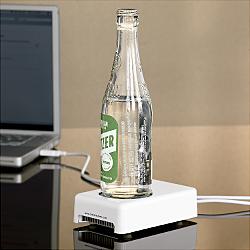 OK, what’s cool about this isn’t so much that it’s a beverage chiller, but that it’s a beverage chiller that plugs into a USB port.
Categories: Tech Talk | 3 Comments »
Microsoft’s Surface Computing
Saturday, June 2nd, 2007Check out this demo of Milan, Microsoft’s new “Surface Computing” product. It’s a really slick, touch screen computer built into the surface of a table. They’ve got some silly applications (a paint program), as well as some more interesting ones, like a photo slideshow/viewer where pictures and video can be moved around the table and resized by stretching them (a la Apple’s iPhone), and a restaurant application that shows interactive menus (the restaurant kind, not the computer kind).
It can also recognize real world objects. The glass of wine you ordered can be tagged so when you put it on the table, the table can “label” it with the kind of wine, the winery, or other advertising/promotional content. And when you’re paying the bill, it can recognize your credit card, and let you split up the bill by dragging pictures of what you ate onto your credit card (not an icon depicting your card, mind you, but the card itself). When you’re done, there’s a “Pay” button on the table that applies the charge to the card.
CNET’s review says the units will cost roughly $10,000 and will start appearing in stores, casinos, hotel lobbies and other public spaces soon. I think this is one of those breakthrough technologies that needs some critical mass to really catch on. Once that happens, mass volume production could make it cheap enough to show up on desks in offices and schools, as well as various places in the home. The kitchen table is an obvious choice, where something very much like the restaurant application would be useful. But what about the bathroom vanity? Imagine a vanity that identified your medication for you, told you how much to take, or reminded you when it was time to refill the prescription.
Back in the ’90s, my employer had a “vision of the future” center that would postulate just these kinds of things, but the Internet was brand new then, and desktop/touchscreen technology had not advanced to this point. Now, it seems like we’ve achieved a point where it would pass the Mom & Dad test…
Categories: Tech Talk, The Future is Now | 2 Comments »
Another blow to privacy…
Friday, May 11th, 2007Google Analytics just revamped their interface to provide more (and easier to understand) results about the way people interact with your web page. Based on this data and a little bit of deductive reasoning, I can make this statement with reasonable confidence (if not reasonable grammar):
Yesterday, my wife’s mother’s brother’s wife’s brother googled his sister (that would be my wife’s mother’s brother’s wife), and then clicked on this page, the third result on the list he received, which, sadly, currently contains her old, non-working e-mail address.
I’ve said it before and I’ll say it again: God Bless Google.
Now, I’m off to update that e-mail address…
Categories: Family Matters, Tech Talk | Comments Off on Another blow to privacy…
ISBS Tech Guide: Windows Vista Security
Sunday, May 6th, 2007Quite a lot has been written about Vista’s security features, and it basically sums up to this: Vista is more secure than XP, but the security features are so annoying that you’ll hate them instantly. So Microsoft still sucks and everyone should buy a Mac.
Allow me to elaborate a little:
It’s become obvious to the folks at Microsoft that most of what has made Windows behave badly in the past (i.e., security breaches and/or the dreaded “Blue Screen of Death”) has been poorly or maliciously written software running on Windows, and not the operating system itself. The complexity of the Windows architecture, while allowing great flexibility and control in most cases, makes it damn near impossible to plug every potential hole someone might stumble upon or intentionally exploit to do damage to a machine.
Vista represents a significant untangling of the architectural spaghetti, but the basic components (e.g., the registry) are still there, so the problems are not completely going away. The solution therefore, has become one of greater transparency to the end user. For the novice user, this works as a great safety net. For the more advanced user, it works as a CYA move for Microsoft, which will annoy some people.
Here’s how it works: If you launch a regular application within Vista, the application runs with no questions asked. However, if you run an application which, in turn, wants to run another application, Vista tells you that’s happening and asks for your permission. I call it the “Grey Screen of Fear.” The entire screen goes dim, and a single message box appears which says, “Windows needs your permission to run the following application: <blah>. OK?” In my experience, this most often happens when a web page wants to run an ActiveX control, or some other non-visible component. Also, some of the more in-depth Control Panel functions cause it to happen (basically, anything that writes directly to the registry).
If you say yes and then Windows proceeds to crash, the perception is now that this particular application is a bad actor and has crashed your system, as opposed to the typical “F*^%(#ing Windows!” reaction that dominates many blogs and message boards.
My advice for the novice user would be to take the Nancy Reagan approach: Just Say No. Sure, they may miss out on some high-end web content, but if they’re truly novices, that’s probably worth the benefit of not watching their machine melt down when the content turns out to be some Adware package. That, or they’ve wandered into the control panel too deeply and probably shouldn’t be there in the first place.
For the advanced user (and here I’m arrogantly lumping myself into this category), the whole thing hardly ever happens, unless you’re working through a specific problem, in which case you might come across it over and over again as you debug something, or work through a tricky install. This is the only time I found it annoying. And while you can turn it off, I’ll admit that despite my annoyance, I didn’t bother. In the typical case, though, when I click a link on a web page and get the GSOF, I’m typically thankful for the heads up. And, in the true test of whether a warning is useful or not, I have actually said no in some cases.
So color me pleased with Vista security thus far. My system has not crashed since I have it (roughly 3 months) despite being on 24/7. The closest I’ve come to a problem was a memory leak after processing some long movie files with Acrobat Premiere Elements, and that was solved with a simple reboot.
One other quick thing about Vista security: the “Run as Administrator” function. In previous versions of Windows, a typical install created one account that had administrator rights on the system (basically, the right to do anything it wanted), and then other accounts could be created with more restrictive rights. In Vista, even the default account isn’t truly an administrator. Some functions (in my experience, installs for software written before Vista was released), will give you an error message saying, “Administrator rights required for this action.” In that case, all you need to do is right-click on the app, and choose “Run as Administrator.” This enables whatever rights have been turned off by default, and provides a nice two-step process for high-security items that is both easy to remember and easy to do. Again, color me pleased.
The major implication for Vista security is often tied heavily to compatibility issues with software written for Windows XP or earlier. Since Vista is stricter about security than its predecessors, things that were allowed in Windows XP are now prohibited in Vista. In next week’s Tech Guide installment, I’ll discuss Vista’s compatibility issues and how I solved (or didn’t solve) the ones I encountered.
Categories: Tech Talk | 2 Comments »
Ladies & Gentlemen – Welcome to the 3,437,560th most popular site on the internet!
Saturday, May 5th, 2007This is a cool site. It ranks web sites by popularity, and tells you what number you are.
With hundreds of millions of sites out there, I can’t say I’m that disappointed with 3,437,560…
Categories: Tech Talk | Comments Off on Ladies & Gentlemen – Welcome to the 3,437,560th most popular site on the internet!